AI tokens
Updated on October 22, 2026
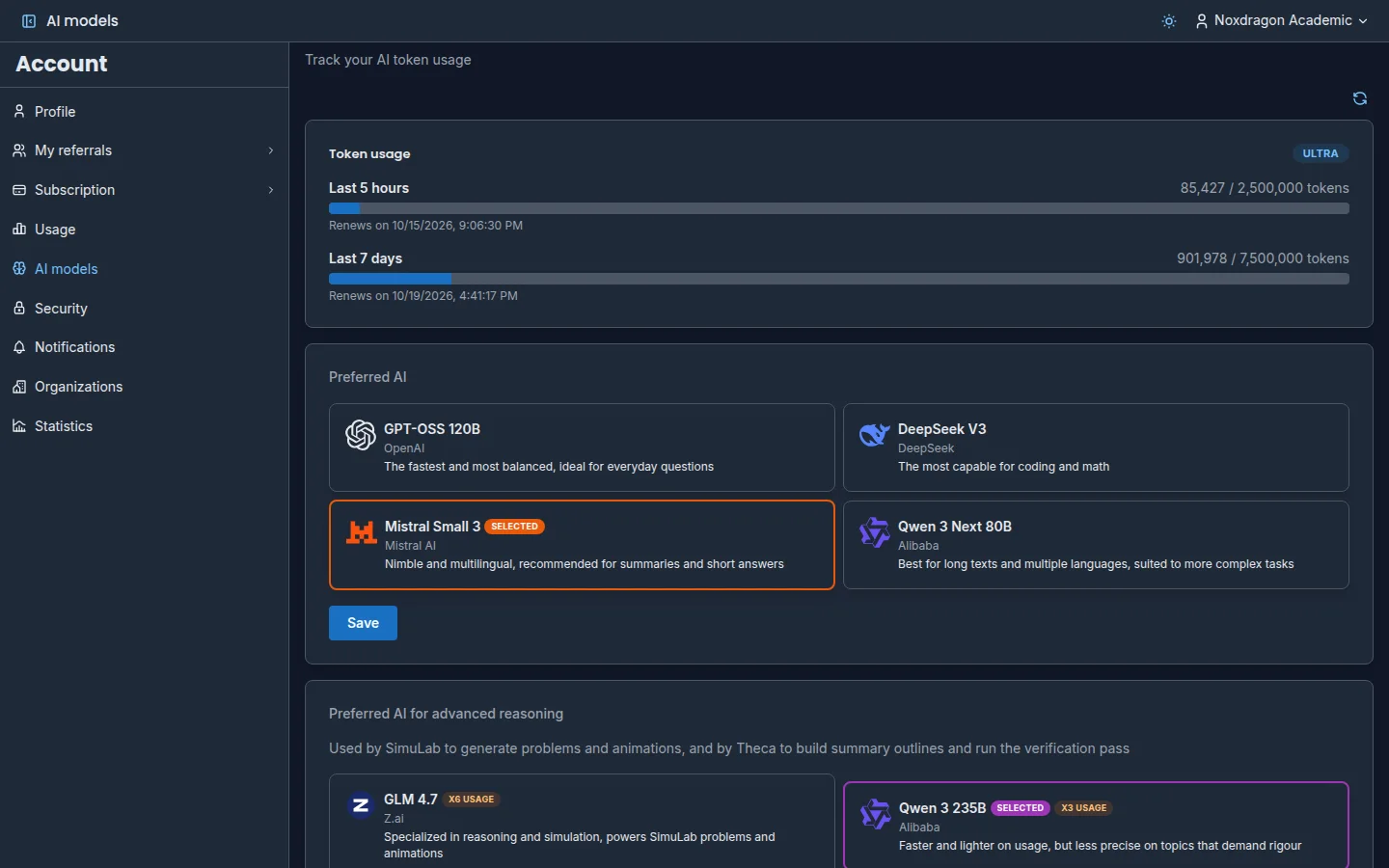
The AI features in every Noxdragon Academic app draw from the same token balance, included in your plan. There are no separate balances per app: EON, Theca, Imagine, and SimuLab share one.
Which features use tokens
- Theca: AI answers in search (Chain of thought uses more, because it splits your question into several searches), summaries, and extracting a book's table of contents.
- Theca → EON: Generate study cards from a summary.
- Theca → SimuLab: Generate problems from a summary.
- EON: extracting the boxes of a diagram card from its image with AI.
- Imagine: generating diagrams with AI when importing Mermaid.
- SimuLab: creating exercises with AI, Generate collection, Extract from book, the concept map in hints, Explain with AI, and grading free-text answers.
Reading, browsing, searching by exact word, reviewing cards, or solving exercises with numeric or multiple-choice answers does not use tokens.
If you'd rather not use AI, turn off the AI Mode switch in the top bar of any app. See Common app controls.
The two usage windows
Your balance is measured over two time windows: Last 5 hours and Last 7 days. Each has its own limit and resets on its own on the date shown on screen.
To see them, go to the Account app and open AI models. Under Token usage you see how much you've used in each window and when it resets. Click Refresh usage to load the latest data.
As you get close to the limit you'll see an Approaching limit notice, and when you reach it, Limit reached. If you turn on AI Usage Alerts in Notifications, we'll also let you know by email.
Choose your AI
In the same AI models section you can choose which AI the apps use:
- Preferred AI: used by general features. Choose from the available models; each one shows which tasks it's best at.
- Preferred AI for advanced reasoning: used by SimuLab to generate exercises and animations, and by Theca to build summary outlines and run the verification pass. Choose from the available advanced reasoning models.
Some AIs use more tokens per task; when that's the case, the card says so, for example x3 usage. Make your choice and click Save.
Choosing your AI is available on paid plans. On Free, the default AI is used.
What happens when your balance runs out
When you reach a window's limit, AI features are unavailable until it resets. Everything else keeps working as usual.
If your balance runs out in the middle of a long job, such as generating cards or exercises from Theca, whatever was already generated is kept. Once your balance resets, you can pick up the rest from the same place.
Always check AI output
AI-generated results (cards, summaries, exercises, explanations, diagrams) can contain mistakes. Check them against your sources before you study or share them, especially on health topics, where a mistake can have consequences. AI is a helper, not a source of truth.
Frequently asked questions
Is usage shared across the four apps? Yes. If you generate a summary in Theca and then exercises in SimuLab, both draw from the same balance.
Which plan should I pick if I use AI a lot? Pro or Ultra. They're the plans designed for everyday AI use, which is why they carry the AI badge. Check each plan's balance on the pricing page.
Next step
- Plans and limits: what each plan includes
- The learning cycle: how to use AI to go from your books to cards and exercises