Daily limits
Updated on October 22, 2026
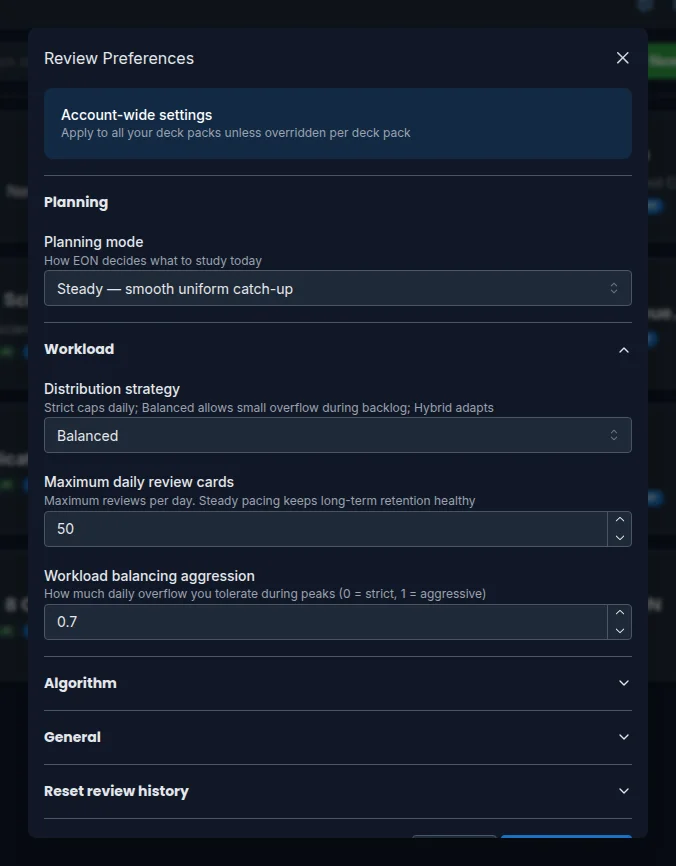
Daily limits protect your pace. Without a ceiling, a large backlog turns into exhausting, demotivating sessions. With well-set limits you learn without burning out and stay consistent.
You'll find them in Review Preferences, Workload section (the maximum new cards is in the Algorithm section). You can set them for your whole account or for a pack.
Maximum review cards per day
Maximum daily review cards sets the most reviews you'll do in a day. Anything beyond that is spread over the following days according to your distribution strategy. In a pack's preferences it's called Maximum review cards per day.
A steady pace helps retention: the brain consolidates better with regular sessions than with marathons.
Maximum new cards per day
Maximum new cards per day controls how many never-seen cards come in each day. Every new card generates reviews over the following days, so adding lots at once inflates your future workload.
If the workload forecast keeps growing week after week, lowering this number helps the most.
Distribution strategies
When a day goes over the limit, the strategy decides what to do with the overflow:
- Strict: never exceeds the daily cap. Whatever doesn't fit moves to the next day. The most predictable option.
- Balanced: allows up to 120% of the limit during a backlog and redistributes. Gives some flexibility when the load rises.
- Hybrid: adapts to the context and becomes strict during high-density streaks.
It's set in Distribution strategy (in a pack, Workload strategy).
Workload balancing aggression
Workload balancing aggression controls how much daily overflow you tolerate during peaks: 0 keeps changes to a minimum and 1 moves cards aggressively to neighboring days. A middle value usually works well.
If you finish each session with energy to spare, your limits are right. If you finish exhausted, or rarely reach the ceiling, it's time to adjust them.
FAQ
Do the limits apply to every pack? The account ones do. To change them in a pack, open its Review Preferences and turn off From account-wide settings on the field you want.
What if I set new cards to zero? No new cards come in; you only review the ones you already know. Useful for consolidating before adding material.
Can Balanced give me more cards than the limit? Yes, up to 120%. That's the difference from Strict, which never goes over.
Can I study beyond my limit on a particular day? Yes. In the Today view, Study ALL opens a session with everything available. See the Today view.
Next steps
- Workload forecast: the effect of your limits over the coming weeks.
- Planning modes: how EON picks the day's cards.
- Plans and limits: your plan's limits.