Chain of thought
Updated on October 16, 2026
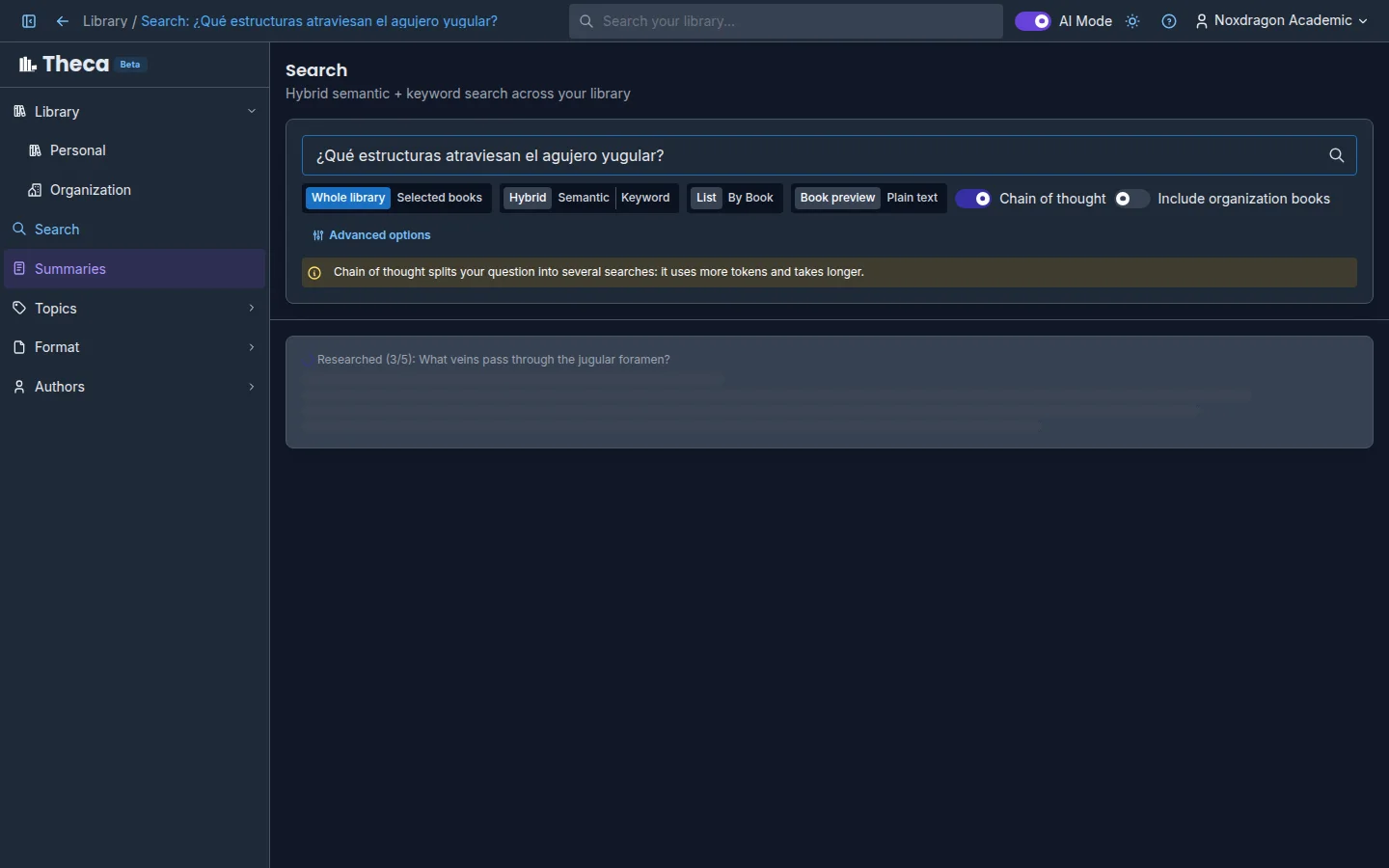
Some questions can't be answered with a single search. "How did the French Revolution differ from the American Revolution?" needs to look up each one separately and then compare what it found. Chain of thought does exactly that: it splits your question into several searches, researches each one in your books, and builds the answer from all the findings.
How to turn it on
- Turn on AI Mode in the top bar.
- In Search, switch on Chain of thought, next to the search modes.
- Type your question and press Enter.
When you switch it on you'll see the notice: Chain of thought splits your question into several searches: it uses more tokens and takes longer. The switch is off by default; turn it on only when you need it.
When it's worth using
- Comparisons: "differences between…", "pros and cons of…".
- Questions that combine several concepts or chapters.
- Complete processes that require gathering information from different parts of your books.
For a straightforward question you don't need it: Theca detects that it's simple and answers as usual, with no extra steps.
Live narration
While Theca researches, instead of a silent wait you'll see what it's doing at each moment:
- Working out how to research this…
- Split into 3 searches; researching…
- Researched (1/3): …, with the question it just resolved.
- Connecting the findings…
The searches run in parallel, so the counter shows how many are done, not a fixed order.
How this answer was researched
When the answer is ready, the How this answer was researched panel appears below it, with a badge showing how many steps there were (for example, 3 steps). It's an accordion: each step shows the question that was researched and the number of findings. Expand it to see:
- Searched: followed by the exact query Theca ran.
- The findings for that step, each with its citation. Hover over the citation to see the book and page, and click it to go to the passage.
- If a step found nothing, it says so: Nothing was found in the books for this step.
Inferred, not quoted
At the end of the panel you may see an Inferred, not quoted section: conclusions Theca drew by combining the findings from the steps. No single source states them, so they're shown separately to help you tell them apart from what's actually written in your books.
Results with chain of thought on
With chain of thought and AI Mode on, the results list shows the passages the answer cites, so you can review each source directly.
FAQ
Why does it take longer? Because it runs several searches and a final synthesis instead of a single search. The live narration shows which step it's on.
Does it use more AI quota? Yes. Each extra search and the synthesis use AI tokens. If the question turns out to be simple, the cost is close to a normal search.
Why don't I see the steps panel? If Theca decides your question is simple, it answers with a single search and there are no steps to show.
Do summaries use chain of thought too? Yes. When writing each section of a summary, Theca researches with the same method, without you having to turn anything on.
Next step
- AI overview — how the answer and its citations are built.
- Search your library — modes, scope, and advanced options.
- Summaries with citations — full documents built from your books.